

A white background car photo is a listing image where the vehicle sits on a clean, pure-white backdrop instead of a lot or street.
Dealers use it to make an inventory gallery look uniform and professional: every car on the same white, shot from the same angles, so the listings read as a consistent set rather than a collection of parking-lot snapshots.
Achieving it well means more than deleting the background — the white has to be genuinely even, the car needs a contact shadow so it does not float, and the edges have to be clean enough to survive on-screen.
This guide explains why dealers choose white, how to produce a proper pure-white result, and when a different background serves better.
The payoff is presentation consistency, and consistency converts. Dealer.com (a Cox Automotive brand) reports that used and certified listings using actual photos are 40% more likely to generate a lead, and that 90% of shoppers prefer real, high-quality photos over stock images (Corcoran & Pierce, Dealer.com, updated March 2026). A white-background treatment keeps the photo real while making the whole gallery look engineered.
Producing consistent white backgrounds across a full inventory is what GEI’s background removal service delivers. This guide is about why and how to get white right.

Key takeaways
- A white background car photo puts the vehicle on a clean, uniform white for a consistent listing gallery.
- White is a merchandising choice, not a marketplace requirement — car platforms accept lot photos too.
- A proper result is pure, even white (not grey patches), with a contact shadow so the car does not float.
- Deleting the background is only step one; the white must be uniform and the edges clean.
- Consistency across the inventory is the real win: same white, same angles, same crop on every car.
- Keep a transparent version too, since it reuses the same cut-out for web and design placements.
Why dealers use white backgrounds
Dealers choose white backgrounds to make an entire inventory look consistent and professional. A lot is visually noisy — other cars, buildings, signage, changing light and weather — so a gallery of raw lot photos looks improvised, and every shot varies. Replacing the background with a uniform white removes that noise and makes each vehicle the sole focus.
The effect compounds across the gallery. When every car sits on the identical white, shot from matching angles, the listing set reads as a catalog rather than a scrapbook, and that polish signals a serious dealer.
This is the same logic behind product photography for online stores, where a white background is the norm — the work GEI’s e-commerce image editing service handles for marketplace sellers.
White is a choice, not a mandate
It is worth being clear: car marketplaces do not require a white background. Platforms like the major automotive listing sites accept real lot and outdoor photos, and many high-performing listings use them.
White is a presentation strategy a dealer chooses for consistency, not a rule to comply with. This matters because it sets the goal correctly. The aim is not to satisfy a platform spec; it is to make your gallery look more professional than the dealer competing for the same buyer.
That framing also means white is not always the right call — an outdoor or showroom background can suit hero images, as covered in the guide to the best backgrounds for car photo editing. Choose white for the uniform inventory grid; choose a scene for the feature shot.
How to produce a proper pure-white background
A good white background is pure and even, not a washed-out grey or a patchy near-white. Getting there takes more than dropping the car onto a white layer.
Cut the car out cleanly
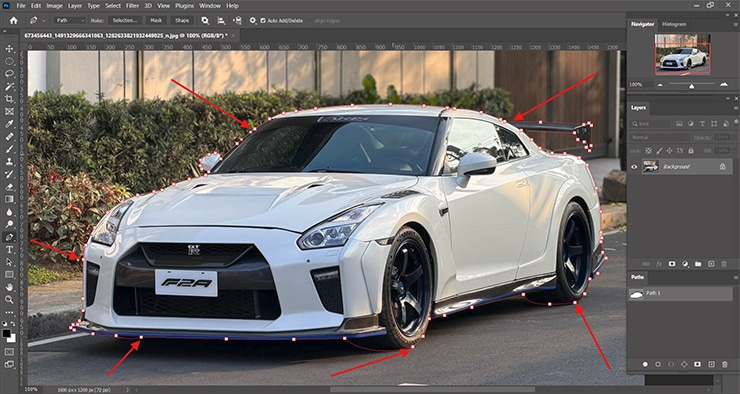
The white is only as convincing as the edge around the vehicle. The precise cut-out method is the subject of the guide to removing the background from a car photo, and GEI’s tutorial on mastering white background removal in Photoshop covers the removal itself.
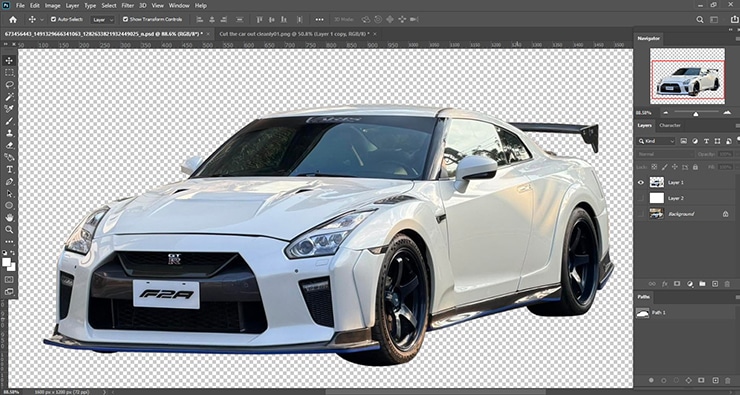
Set a true white, not a dull one
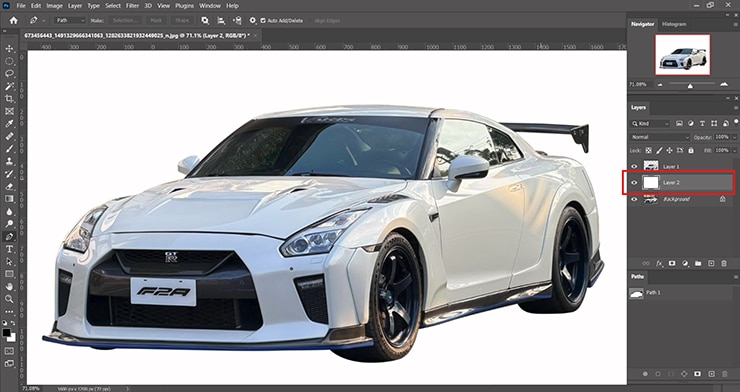
Place the car on a pure-white layer and check the corners with the eyedropper. A background that reads as light grey looks cheap; push it to clean white while keeping the car’s own tones intact.
Add a contact shadow
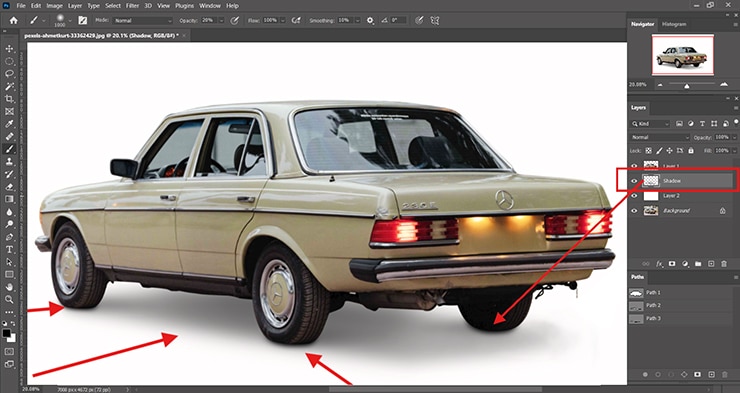
A car on plain white with no shadow floats. Build a soft drop shadow beneath the tires so the vehicle sits on the surface — the technique in the guide to adding a realistic shadow to a car photo.
Keep the edges honest
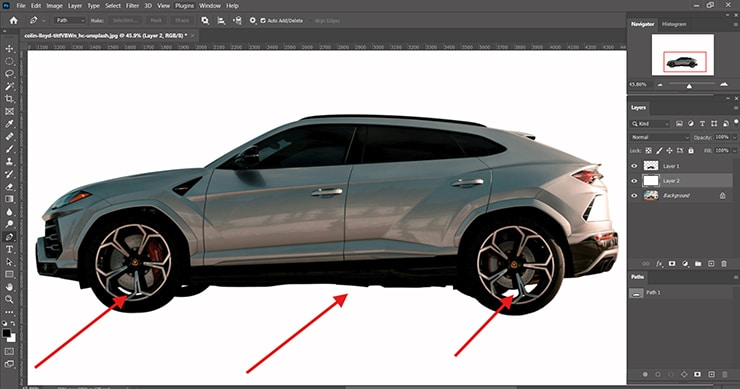
Inspect the outline at full zoom for halos or leftover lot color, especially around glass and wheels, and clean them so the car sits crisply on the white.
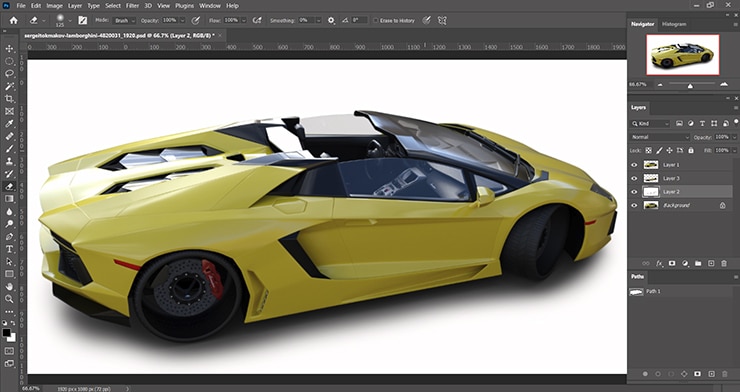
The single biggest quality difference is the shadow. A cut-out car pasted onto white with no shadow is the clearest sign of a rushed job; a soft contact shadow is what makes a white-background photo look studio-shot.
Consistency is the real deliverable
The value of white backgrounds is not any single image — it is the uniformity across the whole inventory. One car on white looks fine; two hundred cars on the identical white, same angles, same crop, and same shadow style is what makes a dealer’s listings look professional at a glance.

That consistency is a production discipline, not a per-image art project. It means fixing the white value, the crop ratio, the shadow style, and the export settings once, then applying them to every vehicle.
This repeatable standardization is exactly where a dedicated car image editing service outperforms ad-hoc in-house editing, because the same specification runs across the entire batch.
Common mistakes
- Grey, not white: a background that reads as dull grey instead of clean white. Push it to true white with the corners checked.
- No shadow: a car floating on white. Add a soft contact shadow under the tires.
- Inconsistent white: different shades or crops across the gallery. Fix one specification and apply it to all.
- Rough edges: halos or lot color left on the outline. Clean the edge at full zoom, especially on glass and spokes.
- Only white, no transparent: missing the reusable transparent version. Export both from the same cut-out.
Frequently asked questions
No. Major car listing platforms accept real lot and outdoor photos, and many strong listings use them. A white background is a presentation choice dealers make to keep an inventory gallery uniform and professional, not a platform requirement. The goal is to look more polished than the competing listing, not to meet a spec.
No. Major car listing platforms accept real lot and outdoor photos, and many strong listings use them. A white background is a presentation choice dealers make to keep an inventory gallery uniform and professional, not a platform requirement. The goal is to look more polished than the competing listing, not to meet a spec.
Almost always because there is no contact shadow, so the car floats on the white. Add a soft drop shadow beneath the tires to anchor it. A patchy or grey-ish background and rough, haloed edges are the other common causes.
Use white for marketplace listings and inventory galleries that show a solid photo. Use transparent when the car will sit on changing colors or designs, like a website or banner. They come from the same cut-out, so producing both is efficient.
Yes, and that consistency is the main benefit. Fix the white value, crop, shadow style, and export settings once, then apply them to every vehicle. This is repetitive at volume, which is why dealers often outsource it to keep the whole gallery uniform.
Want a consistent white-background gallery across your whole lot? See GEI’s background removal service or start a free trial.

Salim Ahmed is the CEO of Graphic Experts India, with over 25 years of expertise in photo editing, clipping path, image retouching, and eCommerce image editing services.