

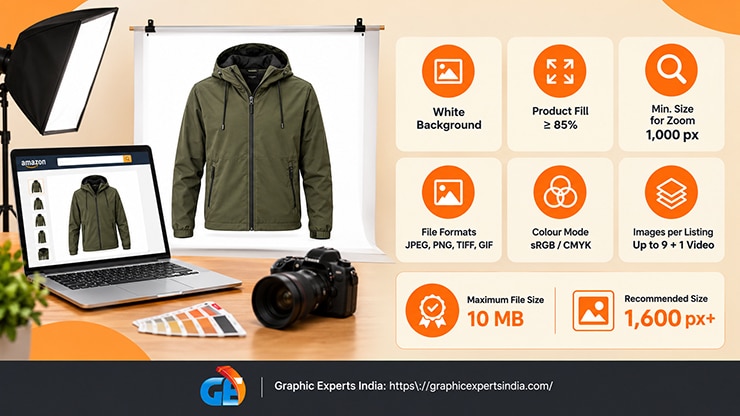
Amazon product image requirements are the technical and content rules every listing photo must meet before Amazon will display it. The main image must sit on a pure white background (RGB 255, 255, 255), the product must fill at least 85% of the frame, and each file must be at least 1,000 pixels on its longest side so buyers can zoom.
Miss these rules and Amazon suppresses the image, the listing, or both. This guide sets out every rule for 2026, links to a deep-dive on each one, and shows where each requirement maps to a single editing step.
Non-compliant images are not a cosmetic problem. Amazon removes listings whose main image breaks the site standards, and a suppressed listing earns nothing while it waits.

The rules below are drawn from Amazon’s image site standards and cross-checked against Amazon’s Seller Forums guidance, accessed 29 October 2026.
Amazon product image requirements at a glance
| Requirement | Amazon’s rule |
|---|---|
| Main image background | Pure white, RGB 255, 255, 255 |
| Product fill (main image) | At least 85% of the frame |
| Minimum size for zoom | 1,000 px on the longest side |
| Recommended size | 1,600 px or larger on the longest side |
| Maximum size | 10,000 px on the longest side |
| Maximum file size | 10 MB |
| File formats | JPEG (preferred), TIFF, PNG, GIF (non-animated) |
| Colour mode | sRGB or CMYK |
| Images per listing | Up to 9 images plus 1 video (category-dependent); first 7 shown |
| Main image content | A real photo of the product only — no text, logos, watermarks, borders or props |
This is the summary. The sections below explain each rule and link to the full breakdown, because a requirement you understand is a requirement you stop failing.
What counts as an Amazon product image requirement?

An Amazon product image requirement is any rule that governs how a listing photo looks, what it contains, or how large the file is. Amazon splits these into two sets. The first set applies to the main image — the hero photo buyers see in search results. The second set applies to every image on the listing, main and secondary alike.
The main image carries the strictest rules because it decides whether a shopper clicks at all. The main image must show the actual product for sale on a pure white background, and the product must occupy at least 85% of the image area.
The main image may not contain text, logos, watermarks, borders, colour blocks, or any accessory that does not ship with the product. Amazon also requires the main image to be a professional photograph — drawings, illustrations, mockups and placeholders are rejected.
The full rule set, with pass-and-fail examples, lives in the dedicated guide to Amazon Main Image Requirements.
Secondary images — the alternate views in the gallery — are more permissive. They can carry lifestyle scenes, infographics, scale references, and text overlays, which is where most of a listing’s selling work happens.
What are the pure-white-background and 85% rules?

The main image background must be pure white, which Amazon defines as the RGB value 255, 255, 255. Pure white matters because Amazon’s search and detail pages are themselves white; a product on true white appears to float with no visible edge, and any off-white grey shows as a dull box around the item.
Camera lighting almost never produces 255, 255, 255 straight out of the shoot, so the background is corrected in editing after capture.
The product must fill at least 85% of the frame. Filling the frame makes the item legible at thumbnail size in search, where the first decision is made.
The background removal and clipping path steps are the exact fixes for both rules: a clean cut-out isolates the product, a true-white canvas replaces whatever was behind it, and the product is scaled to the 85% mark. Graphic Experts India has delivered this background-and-fill correction since 2009.
What size and file specs does Amazon require?

Amazon reads image size in pixels, not inches or dpi. An image needs at least 1,000 pixels on its longest side to trigger the zoom-and-pan feature on the detail page; below that, zoom is disabled.
Amazon recommends 1,600 pixels or larger on the longest side, and most sellers upload square files at 2,000 × 2,000 pixels. The hard ceiling is 10,000 pixels on the longest side, and the file itself must stay under 10 MB.
Amazon accepts four file formats — JPEG, TIFF, PNG and GIF — and prefers JPEG for product photos. Colour mode must be sRGB or CMYK, and sRGB is the safer choice because it renders consistently on screens.
The widely repeated “300 dpi” figure is a print specification with no effect on an on-screen listing; Amazon’s minimum is 72 dpi, and pixel count alone determines whether zoom works. The complete specification sheet — pixels, aspect ratio, megabytes, colour mode and the dpi myth — is set out in Amazon Product Image Size, Dimensions and File Specs.
How many images can an Amazon listing have?

An Amazon listing can hold up to nine product images plus one video, though the exact number of slots depends on the category. Only the first seven images appear on the live listing; a shopper must open the image gallery to see the rest. Every detail page needs at least one image — the main image — to publish.
Nine slots are a selling budget, not a checklist to fill with duplicates. A strong gallery assigns each slot a job: main image, feature or infographic, scale or in-use shot, detail close-up, and so on. The full slot-by-slot plan, with a table of what belongs in each position, is in How Many Images Can an Amazon Listing Have? The 9-Image Slot Plan.
Which rules change by category?

Amazon layers category rules on top of the general standards, and the apparel rules trip up the most sellers. Men’s and women’s clothing must be shown on a human model in the main image; a flat-lay or mannequin shot is not accepted as the main image for adult apparel, and Amazon’s apparel standard allows no ghost-mannequin exception there.
Kids’ and baby clothing, and multi-pack apparel, are the reverse — they must be photographed flat, off the model. Shoes require a single shoe facing left at a 45-degree angle. Books, music, and video or DVD titles use the front cover art filling 100% of the frame rather than 85%.
These are the exceptions most likely to cause a rejection. The per-category breakdown for clothing, shoes, baby, pet, health and home is in Amazon Image Requirements by Category.
What image content does Amazon prohibit?
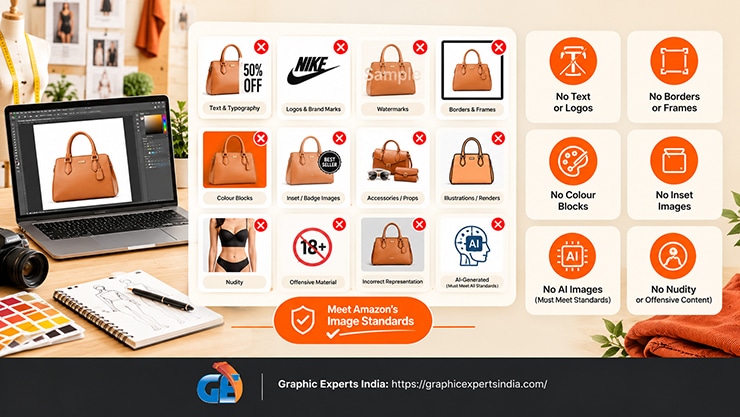
Amazon rejects any main image that misrepresents the product or clutters the white canvas. Prohibited elements include text and typography, logos and brand marks, watermarks, borders and frames, colour blocks, inset or “badge” images, and accessories or props that are not part of the purchase.
Illustrations and renders are not allowed where a real photograph is possible. Amazon also prohibits nudity and offensive material, and it requires the image to accurately represent the product a buyer receives.
A separate 2026 question is AI-generated imagery. Amazon permits AI-assisted image creation, but the finished image must still pass every site standard and must represent the real product truthfully. The policy, the compliance line, and the tools that stay inside it are covered in AI-Generated Images on Amazon.
What about A+ Content and video?

A+ Content and gallery video sit outside the nine-image standard and follow their own specs. A+ Content modules use fixed image sizes — a 970 × 600 header, 970 × 300 banners, and 300 × 300 or smaller feature tiles, depending on the module. A listing video should be at least 1,920 × 1,080 pixels in 16:9, run about 15 seconds (3 minutes maximum), and stay under 500 MB.
Uploading and arranging all of this happens in Seller Central. The step-by-step for adding, changing, reordering and deleting images is in How to Upload, Change, Reorder and Delete Amazon Product Images in Seller Central. If an image you uploaded will not appear, the fixes for images not showing, suppressed or wrong are in the troubleshooting guide.
Do the same images work on other marketplaces?

No — each marketplace sets its own rules, and a compliant Amazon image is not automatically compliant elsewhere. Walmart, eBay, Etsy and Shopify differ on background, minimum pixels, text overlays and the number of images allowed.
Sellers who list on more than one channel need one master image set that clears every platform’s standard at once. The side-by-side comparison is in Product Image Requirements Across Amazon, eBay, Walmart, Etsy and Shopify.
Why image compliance affects sales, not just approval

Meeting the requirements is the floor, not the ceiling. Shoppers act on images before they read a word: the Baymard Institute finds that 56% of users’ first action on a product page is to look at the image, 25% abandon when resolution or zoom is insufficient, and 37% want images that show the product in scale.
Clearing the 1,000-pixel zoom threshold and filling the gallery with purposeful shots is therefore a conversion lever, not only a policy checkbox. The practices that turn compliant images into clicks are in Amazon Product Image Best Practices 2026.
How Graphic Experts India delivers Amazon-ready images

Every rule above maps to an editing step, and that is the work Graphic Experts India does. Background removal and clipping path produce the pure-white 255, 255, 255 canvas and the 85% fill. Resizing and export produce zoom-ready files at 1,600 pixels or larger in the right format and colour mode.
Retouching and shadow work make the product look real and grounded without adding a prohibited element. The result is a gallery that passes Amazon’s standards on upload and is ready to convert.
The service hub for sellers is amazon photo editing, with broader ecommerce image editing for multi-channel catalogues. Background removal starts at $0.39 per image, turnaround averages 24 hours, every file passes a three-step quality check, and the first edits are free with no credit card.
Frequently asked questions
The main image must show the product for sale on a pure white background (RGB 255, 255, 255), with the product filling at least 85% of the frame. It must be a real photograph with no text, logos, watermarks, borders or props, and at least 1,000 pixels on the longest side for zoom.
At least 1,000 pixels on the longest side to enable zoom, and 1,600 pixels or larger is recommended. Most sellers upload square images at 2,000 × 2,000 pixels. The maximum is 10,000 pixels, and files must stay under 10 MB in JPEG, TIFF, PNG or GIF format.
Up to nine product images plus one video, depending on the category. Only the first seven images are shown on the live listing; buyers open the gallery to see the rest. Every detail page needs at least one image to publish.
Only the main image must use the pure white background. Secondary gallery images may use lifestyle backgrounds, infographics, text overlays and scale references, which is where most of the listing’s selling and explaining happens.
Not the main image — text, logos and watermarks are prohibited there. Secondary images may carry text and graphics, so feature callouts, size charts and infographics belong in the gallery slots, not on the hero photo.
Amazon can suppress the individual image or the entire listing until the image is corrected. A suppressed listing does not appear in search and earns nothing, so fixing a non-compliant main image is the fastest way to restore a dead listing.

Salim Ahmed is the CEO of Graphic Experts India, with over 25 years of expertise in photo editing, clipping path, image retouching, and eCommerce image editing services.