

An Amazon product image usually fails to show for one of four reasons: the main image breaks a site standard and the listing is suppressed, the file is below the size minimum or in the wrong format, the listing is still processing, or a system glitch is serving an old image.
The fastest diagnosis is Seller Central’s Fix Your Products page, which names the suppression reason directly. This guide works through each cause and its fix, for both the seller whose listing is suppressed and the shopper whose images will not load.
Most image failures are compliance failures wearing a technical disguise, so the first question is always whether the file meets the rules.
For those rules, see Amazon Product Image Requirements 2026. To add or replace the files themselves, see how to upload, change, reorder and delete Amazon product images.
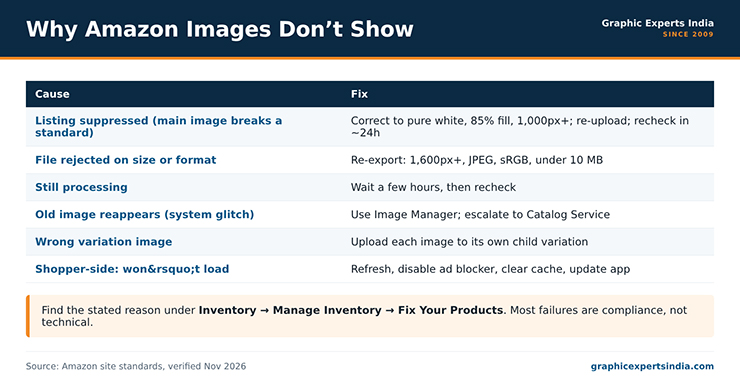
Figure 1. Why Amazon images don’t show, and the fix for each cause.
Why is my Amazon image not showing? The four causes
An uploaded Amazon image fails to appear for one of four reasons, in rough order of frequency.

| Cause | Signal | Fix in brief |
|---|---|---|
| Listing suppressed on a site-standard breach | Listing hidden from search; flagged on Fix Your Products | Correct the image to the standard and re-upload |
| File rejected on size or format | Image never appears after upload | Re-export to spec (≥1,000 px, JPEG, under 10 MB) |
| Still processing | Image absent for minutes to hours after save | Wait a few hours, then recheck |
| System glitch / old image returns | Correct file uploads, old one reappears | Use Image Manager; escalate to Catalog Service |
The first two are the common cases and both are compliance problems the seller can fix directly. The last two are time or platform issues. Work through them in order.
What does “image suppressed” mean and how do you fix it?

An image-suppressed listing is one Amazon has hidden from search because its main image breaks a site standard.
Amazon requires every detail page to carry at least one main image on a pure white background (RGB 255, 255, 255), so the common triggers are a missing main image, a background that is not true white, a logo or promotional text on the main image, a main image below 1,000 pixels on the longest side, or a product that fills less than 85% of the frame.
The listing stays live in your inventory but does not appear to shoppers until the image is corrected.
To fix it, go to Inventory, then Manage Inventory, and open the Fix Your Products page, which names the suppression reason. Edit the product, open the Images section, and upload a compliant main image — pure white background, 85% fill, at least 1,000 pixels, JPEG under 10 MB — then save and finish.
Recheck the listing status after about 24 hours, because Amazon reprocesses the change rather than applying it instantly. The exact main-image standard the file must meet is in the main image rules.
Why does an uploaded image never appear?

An image that uploads but never appears has almost always failed the size or format check. Amazon accepts JPEG, TIFF, PNG and GIF and silently downgrades or drops a file that is too small, wrongly formatted, or over 10 MB.
A file below the 1,000-pixel zoom threshold may display without zoom or not display at all, and a file saved in an unsupported color mode can render wrong.
The fix is to re-export the file to specification: at least 1,600 pixels on the longest side, square, sRGB JPEG, under 10 MB. Re-uploading the corrected file resolves most “uploaded but invisible” cases. The full size-and-format checklist is in Amazon Product Image Size, Dimensions and File Specs.
Why is the wrong image or an old image showing?

Two situations produce a wrong image. The first is a reported system glitch, where a correctly uploaded image is dropped and the previous image reappears; Amazon’s Image Manager tool often clears this, and a persistent case is escalated to Amazon’s Catalog Service team.
The second is a variation mix-up, where a parent-child listing shows the wrong color or size image because the image was uploaded to the parent instead of the specific child variation. Upload each variation’s image to its own child listing so the color a shopper selects matches the image shown.
A third, less common case is a shared-listing dispute: on a listing multiple sellers use, a competitor can upload a non-compliant image that suppresses it. Host your original image as proof of ownership, file an infringement complaint, and resubmit the correct image.
Why are Amazon images not loading for a shopper?

When Amazon product images will not load on the shopper’s side, the cause is usually local rather than the listing. A slow or dropped connection, an ad blocker or privacy extension blocking Amazon’s image servers, a full browser cache, or an outdated app version all stop images rendering.
The fixes are the ordinary ones: refresh the page, disable extensions for Amazon, clear the browser cache, switch network, or update the Amazon app. If images load on another device on the same listing, the problem is the first device, not the product page.
How Graphic Experts India clears image suppressions

A suppression caused by a non-compliant main image is cleared by re-editing the image to the standard, and that is routine work for Graphic Experts India.
Background removal replaces an off-white or busy background with true 255, 255, 255 white and sets the 85% fill; resize image for amazon brings an undersized file up to the zoom-ready 1,600 pixels in the right format. The corrected file is uploaded in place of the one that triggered the suppression.
Editing starts at $0.39 per image, turnaround averages 24 hours, every file clears a three-step quality check, and the first edits are free with no credit card. Graphic Experts India has edited e-commerce product images to marketplace standards since 2009.
Frequently asked questions
Usually the main image breaks a site standard and the listing is suppressed, or the file is below 1,000 pixels, in the wrong format, or over 10 MB. Less often the listing is still processing or a system glitch is serving an old image. Check the Fix Your Products page for the stated reason.
It is a listing Amazon has hidden from search because its main image fails a site standard — a missing main image, a non-white background, a logo or text overlay, a file under 1,000 pixels, or a product filling less than 85% of the frame. The listing returns to search once the image is corrected.
Go to Inventory, then Manage Inventory, open Fix Your Products to see the reason, edit the product, upload a compliant main image (pure white, 85% fill, at least 1,000 pixels, JPEG under 10 MB), and save. Recheck the status after about 24 hours.
The image was uploaded to the parent listing instead of the specific child variation. Upload each color or size image to its own child listing so the variation a shopper selects displays its matching image.
Usually a local issue: a slow connection, an ad blocker or privacy extension, a full cache, or an outdated app. Refresh, disable extensions for Amazon, clear the cache, switch network, or update the app. If images load on another device, the problem is the first device.

Salim Ahmed is the CEO of Graphic Experts India, with over 25 years of expertise in photo editing, clipping path, image retouching, and eCommerce image editing services.